
Don't wait to be proactive...


  • Microsoft Forefront and Mailive SMTP Monitoring

    Last night (Feb 25th, 2013) around 5pm Central time Microsoft’s Forefront service FPE changed its security policies and began blocking most Mailive! test messages.

    In the Forefront control panel it will be necessary to whitelist the sender mailive@knowledgefront.com or the IP Range where the test messages originate: 71.5.105.193 - 71.5.105.198 (netblock 71.5.105.192/29 or 71.5.105.192/255.255.255.248).

    If there are any questions or problems feel free to contact us and we will help out any way we can.

  • Monitoring Websites use Knowledge Front HTTP Monitor

    Using Knowledge Front’s HTTP monitoring service is a simple, reliable and trusted way to externally monitor your websites. Our clients use the HTTP monitor to keep a close watch on their businesses’ websites hosted in a variety of environments:

    • on-premise data centers
    • 3rd party colocation sites
    • PaaS providers such as Heroku and Google App Engine
    • IaaS providers such as Amazon EC2, Rackspace, and Linode

    Externally monitoring your websites provides insight into the responsiveness of your site from your customer’s perspective. The service provides the confidence in knowing that your support staff will immediately be notified of any service disruptions.

  • Help for Help

    Help!

    We’ve put gobs of hours in to making Knowledge Front’s tools easy to use and understand. We also put gobs of hours in to listening to our user base. And we’ve found…..we’re not perfect.

    Shhhhh…..

    newhelp

    So, we’ve finally launched a new library of Help Pages that is sure to improve usability. The new pages are:

    • Formatted for the thinking person (i.e. easier to navigate)
    • Searchable (pure genius!)
    • Chock-full of new instructions (such as setup play-by-play with screenshots)
    • Updated more frequently

    From now on, if you can’t figure it out, check out our new Help Pages. The answer you’re looking for may actually be there.

  • Maintenance Notification

    On Saturday, February 11th, at 9am Eastern we will be pausing the round trip e-mail tests and alerting to perform maintenance. This maintenance will complete the final step of a migration that has been in progress the last few weeks.

    During testing the migration itself takes around 5 minutes. Allotting time for verification and a little wiggle room we anticipate the maintenance will take around 30 minutes.

    Once the maintenance is complete Knowledge Front and Mailive! will be on a new set of database servers as well as new web servers. With the increased performance we expect that all aspects of the system will be much more responsive and allow room for continued growth.

  • Migrating Historical Data

    Our current database servers are about at their capacity, so we have started taking steps to migrate to new hardware.

    Over the next few weeks historical Mailive! data, that's everything over a week old, will be migrated to the new set database servers. As the data is moved it will also be averaged several different ways. This will dramatically increase the speed at which reports can be generated.

    The last 3 months have already been completed, and by current estimates it may take up to an additional week to complete the migration. Until all the data has been moved and averaged pulling reports for dates before October 2011 may be slow. It will depend on what date range is requested and where the migration process is at the time.

  • TLS Support for SMTP Monitoring

    Knowledge Front’s round trip SMTP monitoring, Mailive!, has been updated to support TLS (Transport Layer Security) when sending its test e-mails. Each SMTP monitor can be configured individually with one of three settings.

    On
    Delivery will always use TLS and record a failure if the STARTTLS command does not succeed or if the SMTP transmission fails to complete in any way.
    Auto
    When the SMTP session begins Mailive! sends the EHLO command to the SMTP server being tested and the response includes the capabilities of the SMTP Server. If STARTTLS is in the response then the test will attempt to use TLS and record a failure if the session breaks or the delivery does not succeed. If there is no STARTTLS then delivery happens the old fashioned way, with no encryption
    Off
    When sending a test e-mail Mailive! will never attempt to initiate TLS, even if advertised in the EHLO response of the receiving server.

    For newly added monitors the default will be Auto. Monitors already present in the system will have “Use TLS” set to Off to remain compatible with how it has been up to this point.

  • Alerting Updates

    On Friday, January 7th at 7:00am (Central) there will be a couple of changes to Mailive! alerting.

    In the US and Canada SMS alerts coming from Mailive! will begin to be delivered from 1-952-314-5455. This is the same number currently used for voice call alerts. The short code 35842 will still be used for International SMS and as a backup for SMS alert delivery.

    Email alerts for Mailive! will now come from alert@knowledgefront.com instead of mailive@knowledgefront.com. This is to alleviate issues arising from using mailive@knowledgefront.com for both test messages and alerts. There is no change to the round trip test process - this is only for the alert messages.

  • Mailive! SMS Alerting

    A short time ago Mailive! alerting was upgraded to use true SMS alerting versus sending text messages through the cell providers SMTP to SMS gateways (ie. 6125551212@txt.att.net) which had the possibility of being delayed on their gateway with no real quality of service guarantee.

    We have worked hard and to beef up our technology and are pleased to offer true SMS alerting as an added feature. So instead of

    Mailive! -> SMTP Gateway -> SMS Aggregator -> Your phone

  • Updatable user permissions

    While account administrators have had the ability to add users to Mailive! the new users were created with read-only permissions. Now the account administrator can set which users should have the ability to update e-mail monitors, configure new alerts, and disable alerts.

    For the account administrator (usually the person who originally set up Mailive!) user administration is available under the Account Settings menu item.

    If there are any questions or suggestions feel free to contact us any time.

  • Down-only Alerts

    It is not always desirable to receive both up and down notifications for each alert configured Mailive!. This is especially true when setting multiple alerts which are delivered to the same recipient.

    Simply check the Down Only option when configuring an alert and the system will only send the down notification. When the alert is reset no up alert will be sent, but is always recorded and displayed when viewing the event history.

  • Disabling Alerts

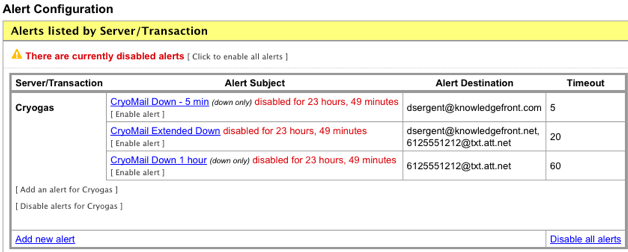
    When performing maintenance it is now easy to disable alerts for a specified period of time inside of Mailive! Simply go to Alert Configuration and there are options available to disable all alerts, disable alerts for a specific server, or disable a single alert.

    summary

    When disabling an alert it is possible to choose from several different timeframes. By using this method there will is no chance that the disabled alerts will be forgotten. Once the disabled time has expired alerts will automatically begin working again.