Don't wait to be proactive...


Changelog

19 posts

  • Welcome to the New KnowledgeFront Blog

    We’re excited to announce that we’ve migrated our blog to the main KnowledgeFront website!

    What’s Changed

    Our blog is now integrated directly into the KnowledgeFront platform, making it easier for you to stay informed about:

    • Product Updates: New features and enhancements to our monitoring services
    • Service Announcements: Important notices about maintenance, upgrades, and new capabilities
    • Best Practices: Tips and insights on effective monitoring and alerting strategies
    • Infrastructure News: Behind-the-scenes updates on how we keep the platform running smoothly

    Easier Navigation

    We’ve enhanced the blog with several improvements:

  • Status Page

    📢 Introducing the Knowledge Front Status Page

    At Knowledge Front, trust and reliability are at the core of what we do. While our goal is 100% uptime, providing you with clear, instant visibility into the health of our services is just as important as keeping them running.

    That’s why we’re excited to announce the launch of our new public status page:

    ➡️ https://status.knowledgefront.com

    When an issue arises, the last thing you want to do is wonder: Is it my configuration, or is the platform experiencing a hiccup? This new page is designed to solve that problem, instantly shedding light on the overall resiliency of the system and answering the critical “us or them” question.

  • Performance and Infrastructure Optimizations

    Recent Updates

    Message Queue Tuning

    We’ve made adjustments to our distributed message queue parameters to improve resilience in challenging network conditions. These tuning efforts help prevent service interruptions when network issues occur, ensuring that monitoring and alerting continue to function reliably.

    Connection Management

    We’ve improved how connections are managed between components to better balance resource utilization and responsiveness. This helps maintain system stability under various load conditions.

    Looking Ahead

    These optimizations are part of our ongoing commitment to improving the reliability and performance of the Knowledge Front platform. We continue to monitor system metrics closely and make adjustments as needed to ensure the best possible experience for our users.

  • Monitor Groups and Dashboard Filter added

    We released a couple new improvements to the Knowledge Front interface and wanted to share some details with you.

    Monitor Groups

    Some of our clients keep a watchful eye on dozens of critical websites and email servers. We’ve added a new feature to the monitoring dashboard that lets you create Monitor Groups to help you sort through all of this real-time monitoring data.

    Monitor Groups are just simple, logical groupings of Monitors that you’d like to group together for quick viewing and filtering on your dashboard.

  • Monitoring additional DNS Record Types

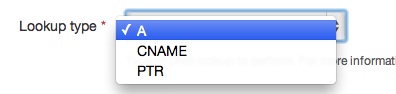
    A, CNAME, and PTR

    The first generation of our DNS monitor did simple A record queries. Good enough to get the basic records necessary for life on the Internet, and quickly we had many requests to expand the types of records available. Based on these requests we have added CNAME and PTR records to the DNS monitoring roster.

    qtypes

    Inspecting results

    We have also added a new option for DNS monitoring.

  • Interface updates

    In the next few days the web sites for Mailive! and Knowledge Front will receive major updates. We’re putting these updates in place to improve the usability of our monitoring services.

    What’s better?

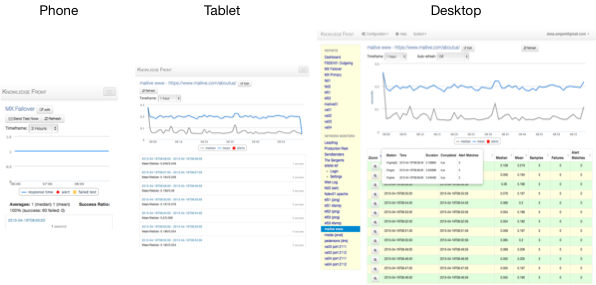
    • Enhanced mobile and tablet support! We’re introducing a new responsive design for improved consistency across phones, tablets, and traditional browsers. responsive
    • Smaller and faster load times! Our philosophy is to make monitoring and alerting simple and reliable for you, so there’s not much extra eye candy to get in the way of the user experience.

    What’s changed?

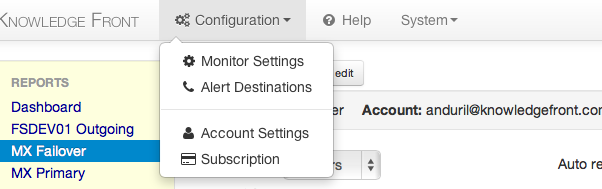
    • Configuration and Settings menus have moved to the top. topmenu
    • The redundant alert configuration page has been removed. For now. Since it was only a slightly different layout of the same information available under the Monitor Configuration it has been set aside for the moment. Future plans include bulk editing of alert settings at which time it will resurface.

    As with any substantial change there may be a few issues that, even after months of testing, only come out in the real world. Let us know of any problems and we will fix them as fast as possible.

  • Help for Help

    Help!

    We’ve put gobs of hours in to making Knowledge Front’s tools easy to use and understand. We also put gobs of hours in to listening to our user base. And we’ve found…..we’re not perfect.

    Shhhhh…..

    newhelp

    So, we’ve finally launched a new library of Help Pages that is sure to improve usability. The new pages are:

    • Formatted for the thinking person (i.e. easier to navigate)
    • Searchable (pure genius!)
    • Chock-full of new instructions (such as setup play-by-play with screenshots)
    • Updated more frequently

    From now on, if you can’t figure it out, check out our new Help Pages. The answer you’re looking for may actually be there.

  • TLS Support for SMTP Monitoring

    Knowledge Front’s round trip SMTP monitoring, Mailive!, has been updated to support TLS (Transport Layer Security) when sending its test e-mails. Each SMTP monitor can be configured individually with one of three settings.

    On
    Delivery will always use TLS and record a failure if the STARTTLS command does not succeed or if the SMTP transmission fails to complete in any way.
    Auto
    When the SMTP session begins Mailive! sends the EHLO command to the SMTP server being tested and the response includes the capabilities of the SMTP Server. If STARTTLS is in the response then the test will attempt to use TLS and record a failure if the session breaks or the delivery does not succeed. If there is no STARTTLS then delivery happens the old fashioned way, with no encryption
    Off
    When sending a test e-mail Mailive! will never attempt to initiate TLS, even if advertised in the EHLO response of the receiving server.

    For newly added monitors the default will be Auto. Monitors already present in the system will have “Use TLS” set to Off to remain compatible with how it has been up to this point.

  • Alerting Updates

    On Friday, January 7th at 7:00am (Central) there will be a couple of changes to Mailive! alerting.

    In the US and Canada SMS alerts coming from Mailive! will begin to be delivered from 1-952-314-5455. This is the same number currently used for voice call alerts. The short code 35842 will still be used for International SMS and as a backup for SMS alert delivery.

    Email alerts for Mailive! will now come from alert@knowledgefront.com instead of mailive@knowledgefront.com. This is to alleviate issues arising from using mailive@knowledgefront.com for both test messages and alerts. There is no change to the round trip test process - this is only for the alert messages.

  • Mailive! SMS Alerting

    A short time ago Mailive! alerting was upgraded to use true SMS alerting versus sending text messages through the cell providers SMTP to SMS gateways (ie. 6125551212@txt.att.net) which had the possibility of being delayed on their gateway with no real quality of service guarantee.

    We have worked hard and to beef up our technology and are pleased to offer true SMS alerting as an added feature. So instead of

    Mailive! -> SMTP Gateway -> SMS Aggregator -> Your phone

  • Updatable user permissions

    While account administrators have had the ability to add users to Mailive! the new users were created with read-only permissions. Now the account administrator can set which users should have the ability to update e-mail monitors, configure new alerts, and disable alerts.

    For the account administrator (usually the person who originally set up Mailive!) user administration is available under the Account Settings menu item.

    If there are any questions or suggestions feel free to contact us any time.

  • Down-only Alerts

    It is not always desirable to receive both up and down notifications for each alert configured Mailive!. This is especially true when setting multiple alerts which are delivered to the same recipient.

    Simply check the Down Only option when configuring an alert and the system will only send the down notification. When the alert is reset no up alert will be sent, but is always recorded and displayed when viewing the event history.

  • Disabling Alerts

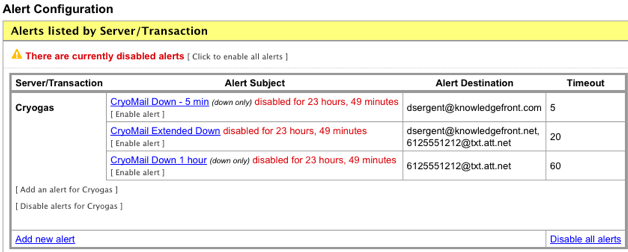
    When performing maintenance it is now easy to disable alerts for a specified period of time inside of Mailive! Simply go to Alert Configuration and there are options available to disable all alerts, disable alerts for a specific server, or disable a single alert.

    summary

    When disabling an alert it is possible to choose from several different timeframes. By using this method there will is no chance that the disabled alerts will be forgotten. Once the disabled time has expired alerts will automatically begin working again.

  • CSV Export

    Wanted to write a quick post to let everyone know that CSV export has been made available in Mailive!

    Now, while viewing a single server's report, the associated data used to generate the report is available for download. Simply click the Export this data as CSV link to retrieve the data and use in Excel or import into an internal system.

    We are constantly striving to improve Mailive!, so if there are any features or improvements you would like to see feel free to contact us and let us know. Thanks!

  • Trigger a Test

    A regularly requested feature for Mailive! has been put into place. Now, instead of needing to wait until the next automatic test is initiated by the system, users have the ability to trigger a test message whenever they like.

    Simply click the [ trigger test transaction ] while viewing the graph and history for the server and a test will be initiated immediately. This should make it much easier to catch errors in mail queues and follow logs while troubleshooting. It's fun and easy!

  • View SMTP Transcript

    Very often when diagnosing mail problems it is helpful to see exactly what SMTP responses are being generated for every step of the transaction. Frequently the root cause can be found by closely inspecting the responses from the HELO and RCPT TO portions of the SMTP conversation. Now Mailive! can help out.

    Recently Mailive! began recording outgoing SMTP sessions for all test messages the system sends. Now they can be viewed through the interface as shown here.

  • Updates to Free MX Lookup Tool

    For the last year Knowledge Front has provided a free MX Lookup tool to provide an external view of what the Domain Name System is reporting for MX records.

    Last week this tool received a nice update. Now, it not only performs the DNS query using Knowledge Front's servers, but finds the authoritative name servers (NS records) for the domain entered and queries those servers for the MX records directly. This can give a better idea of what is being cached vs. what is currently being reported by the authoritative name servers.

  • Mailive! updates

    Recently the Mailive! web site underwent a complete rewrite paving the way for future enhancements. The future is now and there have been several new features added in the last few weeks.

    Trigger test alert on request

    If you just entered a new alert and want to make sure the recipients and text all appear the way you want now you can trigger a test alert. After a new alert has been saved, or while editing an existing alert, pushing the "Test this alert" button will send both the Up and Down notifications for the alert. The messages will be recorded in the event history and prepend the subject with *TEST* making it clear this was not an actual alert.